

Manage Your Team
Organization administrators can invite new members, assign roles, and remove users from the organization.Roles Overview
Every member has one or more roles that determine their permissions. Zephior comes with five default roles:| Role | Description |
|---|---|
| Super Admin | Unrestricted access to everything in the organization |
| Sources Admin | Unrestricted access to all Library entries and Projects |
| Admin | Full access to all features, settings, billing, and member management |
| Member | Can create and work with Library sources and Projects. Cannot access settings or billing. |
| Viewer | Read-only access to sources. Can use Chat. |
Roles & Permissions
Learn about custom roles, access levels, scopes, and the full permission reference
Inviting Members
Select a Role
Choose a role for the new member. They will receive this role automatically when they join.
Invitations are subject to your plan’s seat limits. If you’ve reached the maximum, you’ll need to upgrade your plan.
Assigning Roles
From the Members Page
- Go to Settings → Members
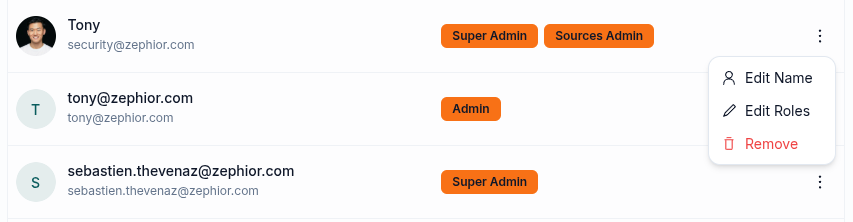
- Find the member and click the actions menu
- Click Edit Roles
- Toggle the roles you want to assign
- Click Save
From a Role’s Detail View
- Go to Settings → IAM and click on a role
- In the role’s Members section, search for a member
- Add the member to assign them this role
Removing Members
- Go to Settings → Members
- Find the member and click the actions menu
- Click Remove and confirm
- They lose access to the organization immediately
- Their role assignments are deleted
- Their source access grants are deleted
- Library sources and Projects they own remain in the organization
Related
Roles & Permissions
Manage roles, access levels, and permissions
Sharing & Access Control
Share sources and manage per-source access
Security Settings
MFA, SSO, and password policies